


Route 66 Navigation
2.2124.00 Reviews
App Specs
- Version
- 2.03
- Updated On
- License
- Free
- Downloads
- 50,000+
- Developer
- Touch Media, s.r.o.
- Categories
- Maps & Navigation
- Platform
- Android
Screenshots
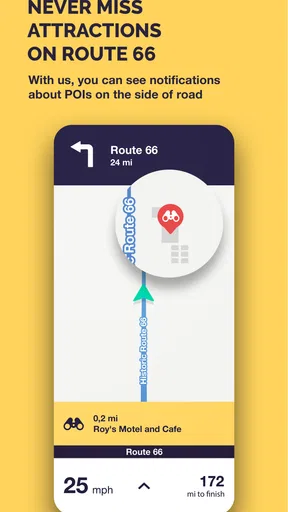
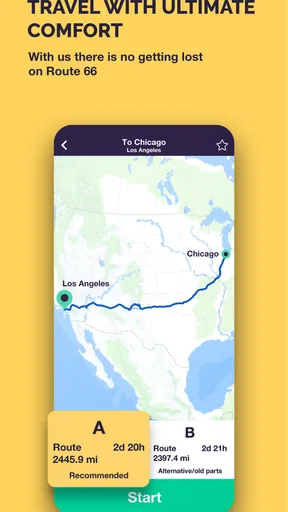
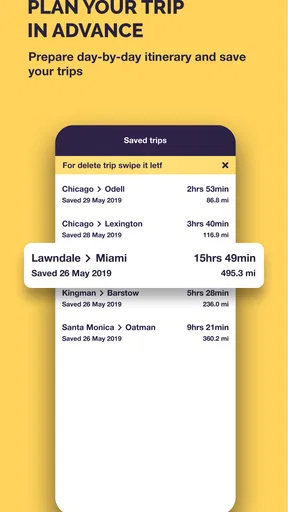
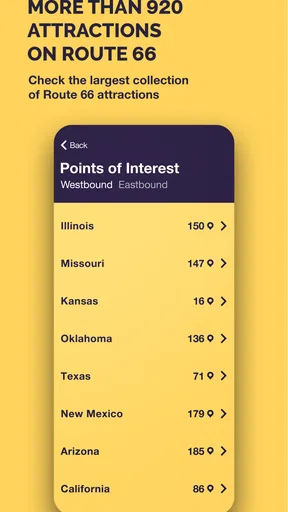
 Analysis by AppCompare
Planning a Route 66 drive is different from asking a map app to find the quickest way across town. I’d want to know which stretches I can follow, how to keep a route usable when reception fades, and whether the app helps me make sensible stops rather than simply move from one point to another. That is the promise behind Route 66 Navigation: a navigation app from Touch Media, s.r.o. aimed at travelers exploring the historic road, not just drivers looking for the fastest everyday commute.
In practice, I’d treat it as a road-trip companion and prepare before leaving. Offline maps can be useful on a long drive, but they work best as part of a plan: check the route and save what you need while you still have a reliable connection, then keep a second navigation option available for ordinary errands or unexpected detours. That small bit of preparation matters more on a road trip than it does on a familiar local journey.
Your Personal Guide on the Mother Road
First things first, if you’re a fan of road trips, Route 66 Navigation is like having a personal travel guide right in your pocket. The app is designed to help you explore the historic Route 66 with ease, guiding you through its scenic landscapes and vibrant towns.
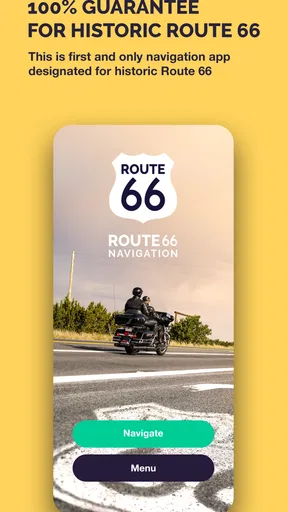
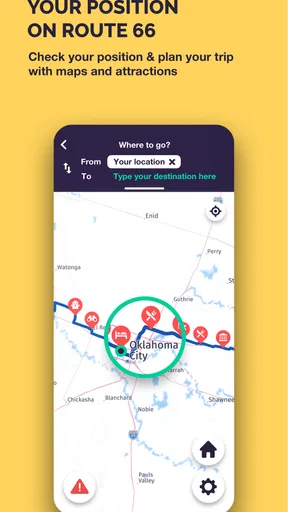
When I first opened the app, I was greeted by an intuitive interface that made navigation a breeze. It’s clear that a lot of thought went into the design, ensuring that even those who are not tech-savvy can easily find their way around. The main dashboard is clean, showing your current location and the various stops along the route.
The key question is how to turn that screen into a useful day on the road. Before setting off, I’d decide whether the goal is to cover distance or to leave room for roadside discoveries. Those are not quite the same trip. A tightly timed schedule can make every stop feel like a delay, while an open-ended day needs enough structure to avoid wasting time deciding where to go next. A route-focused app makes the most sense when I choose a few priorities first and leave breathing room between them.
Features that Keep You Rolling
One of the standout features for me was the detailed audio guide. As you drive, the app provides fascinating stories and historical tidbits about the places you're passing. It’s like having a tour guide who never gets tired of talking. I found myself learning so much about the quirky attractions and hidden gems scattered along the highway.
Audio changes the rhythm of a drive: instead of checking a screen for every bit of context, I can listen while keeping my attention on the road. I’d start with the volume low enough to hear traffic and treat any story as background, not as a reason to look down or make a sudden turn. A passenger can help by choosing stops and managing the phone, especially when a point of interest appears while the driver needs to focus.
Worth Reading Before You Choose

Flipboard Shows What News Apps Must Do Beyond the Feed

Switching to Android Auto Means Rethinking Your Driving Routine

Google Calendar Makes a Crowded Week Easier to Manage

Ludo King Makes the Most of the Minutes Between Plans

Baby Panda World Brings Quick Play to Modern Phones, but Its Game Library Feels Busy

ESPN’s Live Game View Makes Following Close Games Easier
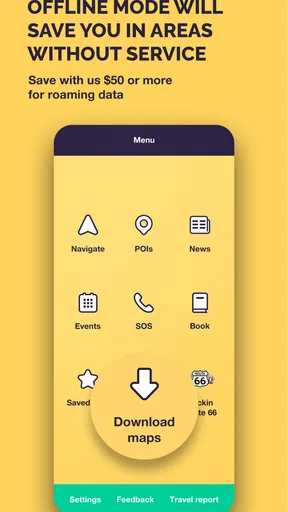
The app also includes offline maps. This is a lifesaver, especially when you’re driving through areas with spotty cell service. No more worrying about losing your way in the middle of nowhere!
There is a useful distinction here: an offline map can keep the route visible, but it does not remove the need to think ahead. I’d check that the relevant map area is available before entering a weak-signal stretch, and I’d avoid assuming that every new destination or last-minute change will be equally convenient without a connection. If the day’s plan changes, stopping somewhere safe to review it is a better workflow than trying to troubleshoot while moving.
Another cool feature is the built-in trip planner. You can map out your entire Route 66 adventure in advance, selecting the attractions you don’t want to miss. This way, you can maximize your time and ensure you’re getting the full experience.
For a practical planning pass, I’d group intended stops by the portion of the day rather than build an itinerary that leaves no flexibility. Marking a handful of must-sees gives the drive a shape; keeping other possibilities optional makes it easier to adapt if a meal takes longer or a detour looks more appealing. That is a better fit for a historic-road trip than treating the planner like a strict checklist.
Keeping it Real with Real-Time Updates
One thing that really impressed me was the real-time updates. The app keeps you informed about current road conditions, traffic updates, and even weather forecasts. It’s like having a friend who’s always looking out for you, making sure your trip is as smooth as possible.
When conditions change, I’d use updates as a prompt to pause and reassess, not as a guarantee that every disruption has already been handled. A road trip can involve a handoff between the route on the phone and decisions made by the people in the car: a passenger can read a notice, the driver can choose whether to stop, and everyone can agree on a revised plan before continuing. That separation keeps navigation from becoming a distraction.
If you’re someone who loves social interaction, the app’s community feature is a nice touch. You can connect with fellow travelers, share tips, and even swap stories about your adventures on the road. It’s a great way to feel part of the Route 66 family.
Community advice is most useful as inspiration rather than a substitute for checking the route yourself. A tip about a stop can help shape the day, but I’d still consider whether it fits the direction of travel and the time available. This is especially helpful when several people are planning together: one person can collect ideas, while another keeps the itinerary manageable instead of adding every suggestion.
Let’s Talk Usability
Now, let’s get into how easy the app is to use. The developers have done a fantastic job at ensuring the app runs smoothly. I didn’t encounter any lag or crashes, which is crucial when you’re relying on it for navigation. The app’s layout is user-friendly, with all the features easily accessible from the main screen.
Its appeal is clearest for someone who wants Route 66 to be the point of the journey: a traveler who values the route’s character, wants context along the way, and is willing to plan stops rather than use navigation only as a utility. If I were commuting, comparing several possible routes across a city, or making frequent last-minute changes, I’d reach first for a general-purpose map app. Those tools are usually a more natural fit for everyday navigation, while this app’s draw is its focus on a specific road-trip experience.
Downloading and setting up the app was a breeze. It’s available on both Android and iOS, so no matter what device you’re using, you’re covered. The installation process is straightforward, and you’re guided through the setup with helpful prompts.
Before committing to a long drive, I’d do a short setup check at home: open the route, inspect the day’s intended stops, and make sure the offline map is ready for the areas I expect to cover. I’d also place the phone where it can be seen without blocking the view, and settle on audio volume before pulling away. These are simple steps, but they reduce the chance that a small setup task turns into a roadside interruption.
It is free to install, which makes trying it a low-commitment way to see whether a Route 66-focused guide suits your travel style. The trade-off to keep in mind is that in-app purchases range from $19.99 to $49.99 per item, so I would review what is included in any purchase screen carefully and decide whether it serves the trip I actually plan to take. I wouldn’t treat a free download as a reason to buy anything automatically.
Who Will Get the Most from It
For a couple taking a leisurely drive, a solo traveler who likes planning ahead, or a family choosing a few memorable stops, the combination of navigation, trip planning, audio, and offline maps makes a coherent package. It can help turn an unfamiliar road into a sequence of places with context, rather than a stretch of pavement between overnight stays. A passenger who enjoys researching local history may get even more from the audio and community angle than someone who simply wants directions.
On the other hand, I’d skip it as my only navigation tool if I needed broad coverage for daily driving, relied on frequent live rerouting, or wanted a map app primarily for changing destinations on the fly. It is also a poor match for a driver who expects the phone to make every decision; the best trip still depends on checking plans safely and using judgment when conditions or priorities change. The age rating is Everyone, but that does not mean every feature or purchase will suit every traveler’s needs.
For someone weighing whether to try it, the scale of its audience offers a little context, not a verdict: it has over 50,000 installs, an average rating of 2.3 from 399 ratings, and 115 written reviews. I’d read that modest rating as a reason to test the app before depending on it for a major trip, rather than as proof that it will or won’t work for a particular traveler. It runs from version 2.03 and requires Android 7.0 or later; the app is also available on iOS.
Where the Journey Can Get Less Smooth
The biggest practical risk is leaning too heavily on any single phone-based guide. Offline access helps with connectivity, but it is still sensible to plan the day before coverage becomes unreliable, keep the driver’s attention on the road, and have a way to reconsider a stop without navigating menus in motion. If a route change is important, pull over safely first. That advice is not a knock on the app; it is part of using navigation responsibly on an unfamiliar trip.
There is also a difference between a route-specific guide and a full travel-planning service. This app can make Route 66 exploration feel more focused, but it should not be expected to replace every decision about meals, lodging, timing, or changing plans. I’d pair it with whatever planning method I already trust for those parts, while avoiding the temptation to keep several competing maps open and create confusion about which route to follow.
My everyday test would be a day when I have a few hours to drive, one attraction I especially want to see, and no desire to spend the whole trip staring at a screen. I’d select that priority in advance, keep one or two flexible possibilities, use the audio for context, and let the map support rather than dictate the drive. If the weather or traffic changes the plan, I’d stop with the passenger and decide whether to continue, skip a stop, or use another navigation option for a detour. That workflow plays to the app’s strengths without pretending it removes every uncertainty.
Final Thoughts
So, is Route 66 Navigation worth downloading? Absolutely! Whether you’re a history buff, a road trip enthusiast, or just someone looking for a fun adventure, this app has something for everyone. It’s like having a Swiss Army knife for your Route 66 journey, packed with tools and features to make your trip unforgettable.
If you’ve ever wanted to explore the Mother Road with confidence and ease, this app is your go-to guide. Just download it, hit the road, and let the adventure unfold!
My recommendation is more measured: try it if Route 66 itself is the reason you’re traveling and you want a guide built around that experience. Give yourself time to learn its planning flow before relying on it, and keep a familiar alternative for general navigation or unexpected changes. That balance lets the app contribute what it is best suited to provide—route-focused exploration—without asking it to be every travel tool at once.
Pros
- User-friendly interface for easy navigation.
- Detailed maps with historical landmarks.
- Offline mode available for remote areas.
- Voice-guided directions enhance experience.
- Regular updates with new points of interest.
Cons
- Limited language options for voice guides.
- Requires significant storage space.
- Battery drainage can be high on long trips.
- No real-time traffic updates available.
- In-app purchases for premium features.
FAQs for Route 66 Navigation
What is Route 66 Navigation and how does it work?
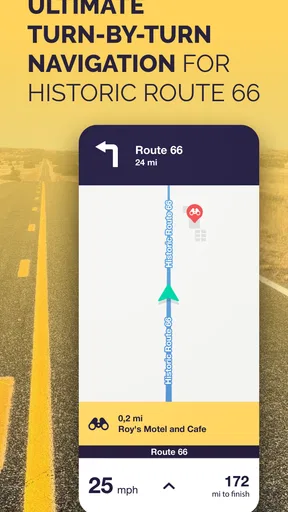
Route 66 Navigation is a specialized GPS-based app designed to guide travelers along the historic Route 66. It offers turn-by-turn navigation, offline maps, and points of interest along the route. The app provides a comprehensive guide to attractions, dining options, and accommodations, ensuring travelers can enjoy a seamless journey along the iconic highway.
Can I use Route 66 Navigation offline?
Yes, Route 66 Navigation allows users to download maps for offline use. This feature is particularly useful when traveling through remote areas with limited or no internet connectivity. By downloading the maps beforehand, you can ensure uninterrupted navigation throughout your journey on Route 66.
What features does Route 66 Navigation offer?
Route 66 Navigation includes features such as turn-by-turn navigation, offline maps, points of interest, and historical information about Route 66. It also offers user-friendly interface elements, real-time traffic updates, and customizable route options to enhance your travel experience along the historic highway.
Is Route 66 Navigation available for both Android and iOS?
Yes, Route 66 Navigation is available for both Android and iOS devices. Users can download the app from the Google Play Store or Apple App Store. The app provides a consistent experience across both platforms, ensuring that all features are accessible regardless of the device you are using.
Are there any in-app purchases or subscription fees for Route 66 Navigation?
Route 66 Navigation may offer in-app purchases or subscription options to access premium features. While the basic navigation features may be free, additional content such as detailed guides, exclusive points of interest, or ad-free experiences might require a purchase or subscription. Be sure to check the app store listing for the most current pricing and features.


